

들어가며
본 글을 통해 제가 평소에 궁금했던 Log4j2에 대해서 직접 코드와 아키텍처를 분석해 보겠습니다.
Log4j2는 2021년 11월에 Log4 Shell(취약점)로 인해 엄청난 문제가 발생했었는데, 당시의 저는 대학생이었고 사건에 대해서는 대략 들었지만 지식이 없어 더 깊게 알지 못했습니다. 지하철에서 옆 자리의 어느 개발자 분들이 이에 대해 이야기 나누는 것을 들었던 기억나네요.
이번 기회를 통해 해당 사태의 주인공인 Log4j2에 대해서 더 깊이 알아볼 수 있으면 좋겠습니다.
Module
Log4j 프로젝트는 수많은 모듈로 이루어진 멀티 모듈 구조를 이루고 있습니다.
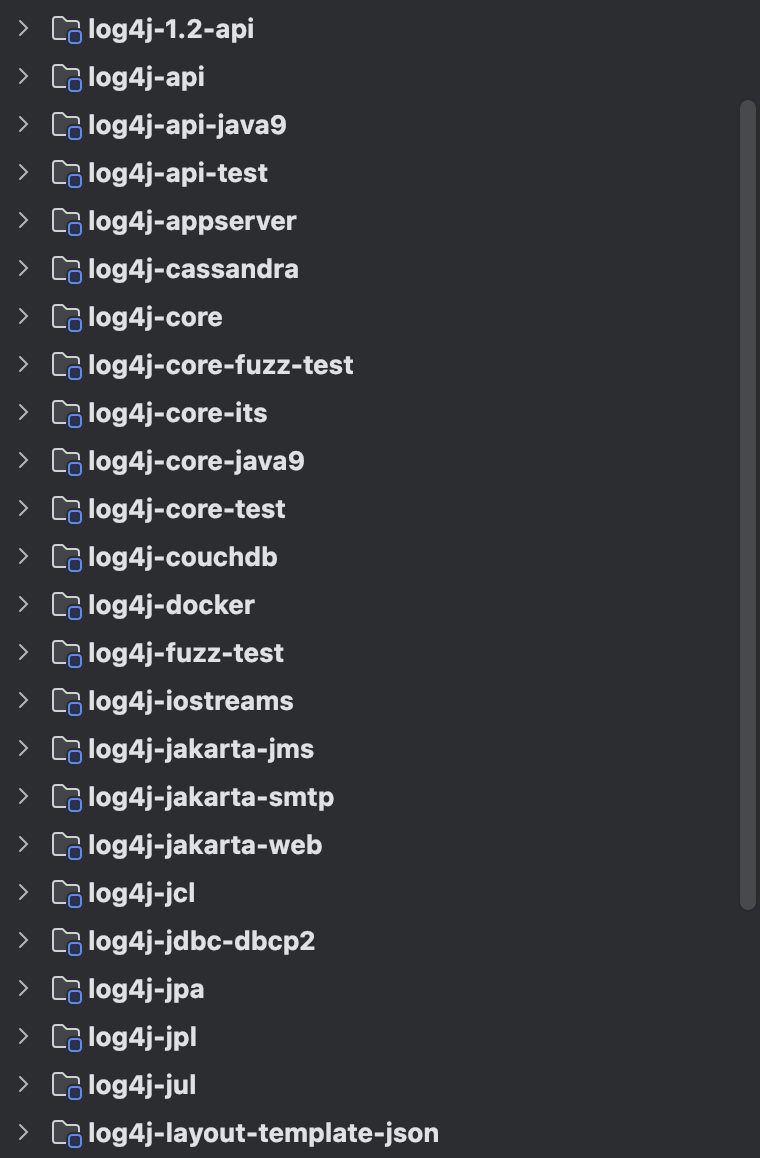
너무 많아 일부를 가져온 것이고, 아래에 몇 개의 모듈이 더 있습니다.
그만큼 log4j는 다양한 환경에서 작동될 수 있도록 구현되어 있다는 것을 알 수 있습니다.
여기서 가장 핵심적이고 중요한 모듈은 log4j-api와 log4j-core입니다.
Log4j는 기본적으로 Log4j API라는 logging API와 logging Implementation(구현체)인 Log4j Core로 이루어져 있고 이 두 개의 모듈에 해당합니다.
Logging API란?
개발자의 코드나 그에 의존하는 라이브러리가 직접 로그를 기록하는 인터페이스입니다. 이는 컴파일 시점(코드를 작성하는 시점)에 필요하며, 특정 로깅 구현체에 종속되지 않도록 설계되어 있습니다. 즉 애플리케이션이 로그를 기록할 수 있도록 해주지만, 특정한 로깅 구현체에 묶이지 않습니다. 대표적인 logging API로는 Log4j API, SLF4J, JUL(Java Logging), JCL(Apache Commons Logging), JPL(Java Platform Logging), JBoss Logging 등이 있습니다. Spring Boot를 사용해 보셨으면 SLF4J가 많이 익숙하실 텐데, 이것 역시 logging API이며 Spring Boot starters는 기본적으로 Logback을 구현체로 사용하고 있습니다.
Logging Implementation란?
로깅 구현체는 런타임 시점에서만 필요로 하며 그 덕분에 프로그램을 다시 컴파일할 필요 없이 다른 것으로 바뀔 수 있습니다. OOP의 원칙 중 하나인 OCP(Open-Closed-Principle)에 부합하는 특징입니다. Log4j Core, JUL(Java Logging), Logback이 대표적인 구현체입니다.
이렇게 API(인터페이스)와 구현체로 굳이 나누는 이유는 결국 프로그램의 유연성을 위해서입니다.
API를 통해 통일된 역할과 책임을 정하고, 구현체를 통해 각자만의 구현 방법으로 역할과 책임을 수행할 수 있습니다.
이를 통해 개발자는 같은 API를 구현하고 있는 다양한 구현체들의 장단점을 비교해서 상황에 맞는 것을 선택하고, 기존의 코드의 수정 없이 변경할 수 있습니다. 이런 부분이 객체지향의 매력 중 하나라고 생각합니다.
Architecture
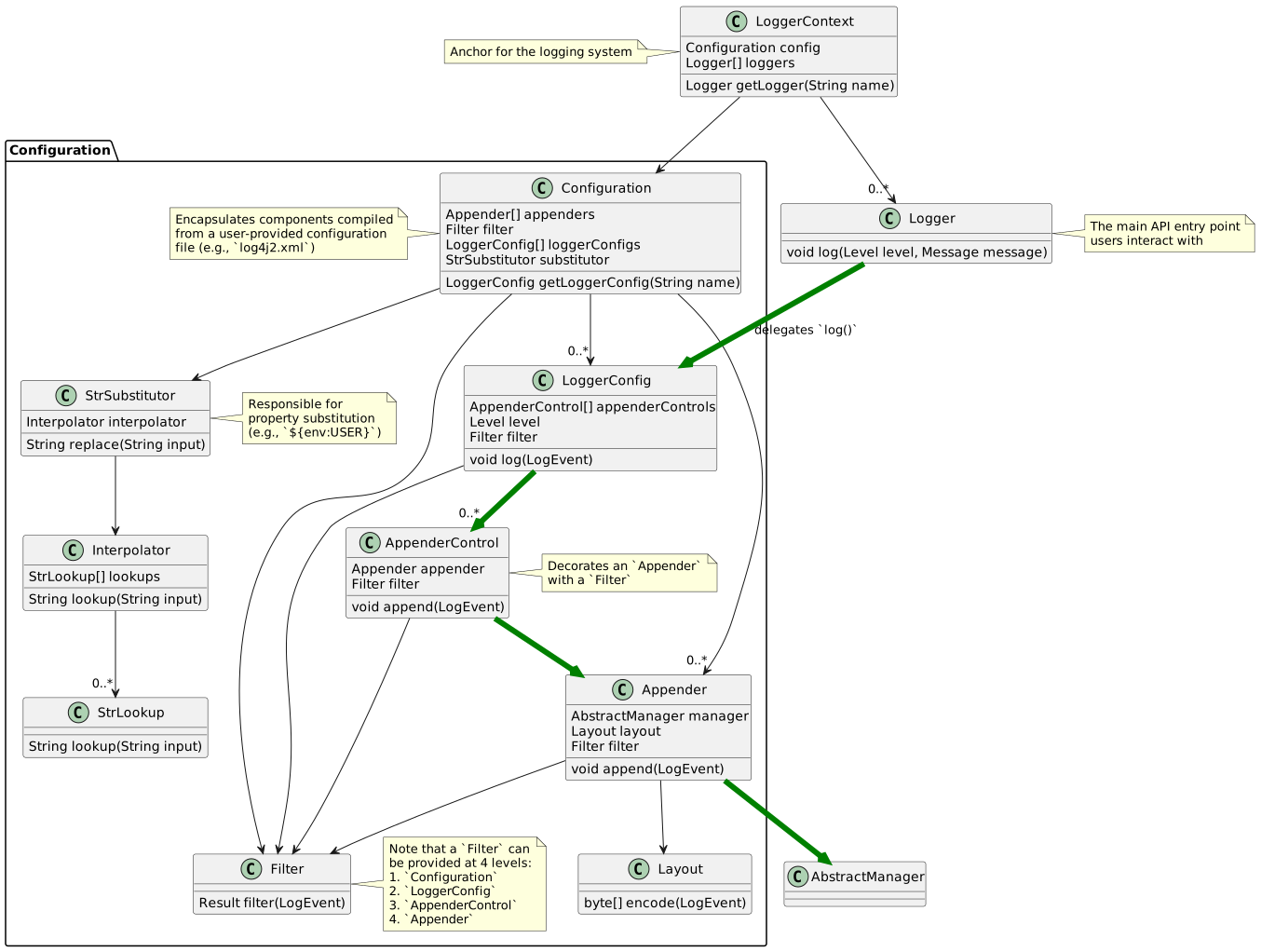
Log4j Core는 Log4j API의 레퍼런스 구현체이며, 여러 구성 요소들로 이루어져 있습니다.
아래 그림은 아키텍처 중에서 주요 클래스를 나타냅니다.
- LoggerContext
- 구성의 중심 역할을 하는 요소로, Configuration과 함께 생성됩니다. 이 둘은 직접적으로(즉, 프로그래밍 방식으로) 생성할 수도 있고, Log4j와 처음 상호작용할 때 간접적으로 생성될 수도 있습니다.
- LoggerContext는 사용자가 로그를 기록할 때 사용하는 Logger들을 생성합니다.
- Appender는 로그 이벤트(LogEvent)를 파일, 소켓, 데이터베이스 등과 같은 대상에 전달하는 역할을 하며, 일반적으로 로그 이벤트를 인코딩하기 위해 Layout을 사용하고, 대상 리소스의 생명 주기를 관리하기 위해 AbstractManager를 사용합니다.
- LoggerConfig는 하나의 Logger에 대한 설정을 캡슐화하며, AppenderControl과 AppenderRef를 통해 Appender들을 구성합니다.
- Configuration은 문자열 형태의 값에서 프로퍼티 치환을 가능하게 하기 위해 StrSubstitutor 등의 도구들을 갖추고 있습니다. 저희가 많이 사용하는 ~.yml, ~.xml 설정 파일들을 읽고 설정합니다.
- 일반적인 log() 호출은 다음 순서대로 클래스들을 거치며 호출 체인이 이어집니다: Logger → LoggerConfig → AppenderControl → Appender → AbstractManager. 이 흐름은 초록색 화살표로 표현되어 있습니다.
Configurator
각 주요 클래스와 구성 요소와 LoggerContext를 보기 전에 Configurator라는 클래스를 보겠습니다.
해당 클래스는 org.apache.logging.log4j.core.config 패키지 내에 있습니다.
LoggerContext는 어디에서 먼저 생성되어 사용될까?라는 궁금증에 해당 클래스를 먼저 찾았습니다.
LoggerContext도 결국은 어디선가에서 생성, 초기화, 설정이 이루어져야 하는데, Configurator가 LoggerContext를 몇 가지 방법으로 초기화하는 책임을 가지고 있습니다.
특히 initialize()라는 여러 번 오버로딩된 메서들이 있습니다. 다른 절에서 Configuration을 읽어 들이는 부분을 보기 때문에 이와 관련된 일부 코드를 가져오겠습니다.
그런데 신기하게도 첫 줄부터 이미 코드에 LOGGER가 보입니다. 아직 LoggerContext가 초기화 중인데 어떻게 있을까요? 여기서 사용되는 LOGGER는 로깅 시스템에서 발생하는 이벤트를 기록하는 역할을 합니다. StatusLogger는 로우레벨 로그를 처리하기 위해 로깅 시스템이 의존할 수 있는 독립적이고 자급자족하는(self-sufficient) 컴포넌트로 설계되어 있습니다.
public final class Configurator {

    private static final String FQCN = Configurator.class.getName();

    private static final Logger LOGGER = StatusLogger.getLogger();

    // 1
    private static Log4jContextFactory getFactory() {
        final LoggerContextFactory factory = LogManager.getFactory();
        if (factory instanceof Log4jContextFactory) {
            return (Log4jContextFactory) factory;
        }
        if (factory != null) {
            LOGGER.error(
                    "LogManager returned an instance of {} which does not implement {}. Unable to initialize Log4j.",
                    factory.getClass().getName(),
                    Log4jContextFactory.class.getName());
        } else {
            LOGGER.fatal(
                    "LogManager did not return a LoggerContextFactory. This indicates something has gone terribly wrong!");
        }
        return null;
    }

    ...

    // 2
    public static LoggerContext initialize(final Configuration configuration) {
        return initialize(null, configuration, null);
    }

    ...

    public static LoggerContext initialize(
            final ClassLoader loader, final Configuration configuration, final Object externalContext) {
        try {
            final Log4jContextFactory factory = getFactory();
            return factory == null ? null : factory.getContext(FQCN, loader, externalContext, false, configuration);
        } catch (final Exception ex) {
            LOGGER.error(
                    "There was a problem initializing the LoggerContext using configuration {}",
                    configuration.getName(),
                    ex);
        }
        return null;
    }

    ...
}

public class Log4jContextFactory implements LoggerContextFactory, ShutdownCallbackRegistry {

	private static final StatusLogger LOGGER = StatusLogger.getLogger();
    private static final boolean SHUTDOWN_HOOK_ENABLED = PropertiesUtil.getProperties()
            .getBooleanProperty(ShutdownCallbackRegistry.SHUTDOWN_HOOK_ENABLED, !Constants.IS_WEB_APP);

    private final ContextSelector selector;
    private final ShutdownCallbackRegistry shutdownCallbackRegistry;

    ...

    public LoggerContext getContext(
            final String fqcn,
            final ClassLoader loader,
            final Object externalContext,
            final boolean currentContext,
            final Configuration configuration) {
        final LoggerContext ctx = selector.getContext(fqcn, loader, currentContext, null);
        if (externalContext != null && ctx.getExternalContext() == null) {
            ctx.setExternalContext(externalContext);
        }
        if (ctx.getState() == LifeCycle.State.INITIALIZED) {
            ContextAnchor.THREAD_CONTEXT.set(ctx);
            try {
            	// 3
                ctx.start(configuration);
            } finally {
                ContextAnchor.THREAD_CONTEXT.remove();
            }
        }
        return ctx;
    }
}- LogManager라는 클래스를 통해 Log4jContextFactory를 가져옵니다.
- 다시 오버로딩된 initialize()를 타고 들어가면 Log4jContextFactory로 getContext() 메서드를 호출하고 LoggerContext를 리턴합니다.
- LoggerContext의 start() 메서드에 Configuration을 넘기면서 설정하도록 합니다. 이때 start() 메서드는 생명주기에 관한 것이고 다음 절에 설명하겠습니다.
갑자기 등장하는 Log4jContextFactory는 어떤 친구일까요?
이는 ContextSelector를 찾아서 LoggerContext를 로드하는 역할을 하는 팩토리입니다.
ContextSelector도 역시 인터페이스이고, Log4jContextFactory내에서 생성됩니다.
private static ContextSelector createContextSelector() {
    try {
        final ContextSelector selector =
                Loader.newCheckedInstanceOfProperty(Constants.LOG4J_CONTEXT_SELECTOR, ContextSelector.class);
        if (selector != null) {
            return selector;
        }
    } catch (final Exception e) {
        LOGGER.error("Unable to create custom ContextSelector. Falling back to default.", e);
    }
    // StackLocator is broken on Android:
    // 1. Android could use the StackLocator implementation for JDK 11, but does not support multi-release JARs.
    // 2. Android does not have the `sun.reflect` classes used in the JDK 8 implementation.
    //
    // Therefore, we use a single logger context.
    return SystemUtils.isOsAndroid() ? new BasicContextSelector() : new ClassLoaderContextSelector();
}
Android가 아닐 경우 ClassLoaderContextSelector를 생성하는 것으로 보입니다.
이때 ClassLoader는 JVM 내에서 자바 바이트코드를 전달받는 클래스 로더를 뜻합니다.
ClassLoaderContextSelector 클래스를 보면 드디어 LoggerContext의 생성되는 부분을 찾을 수 있게 됩니다.
public class ClassLoaderContextSelector implements ContextSelector, LoggerContextShutdownAware {

    protected static final StatusLogger LOGGER = StatusLogger.getLogger();

    protected static final ConcurrentMap<String, AtomicReference<WeakReference<LoggerContext>>> CONTEXT_MAP =
            new ConcurrentHashMap<>();

    private final Lazy<LoggerContext> defaultLoggerContext = Lazy.lazy(() -> createContext(defaultContextName(), null));

    ...
    protected LoggerContext createContext(final String name, final URI configLocation) {
        return new LoggerContext(name, null, configLocation);
    }
    ...

}
갑자기 너무 많은 클래스가 나와 혼잡합니다. 한번 정리하겠습니다.
- Configurator: 로깅 시스템을 초기화하고 구성하는 역할을 합니다. 이 클래스는 설정 파일의 위치, 컨텍스트 이름, 다양한 선택적 매개변수들을 이용하여 LoggerContext를 생성하는 여러 가지 방법을 제공합니다. Log4jContextFactory를 사용합니다.
- Log4jContextFactory: ContextSelector를 찾아서 LoggerContext를 로드하는 팩토리 클래스입니다. 이 클래스는 로깅 컨텍스트를 선택하고 적절한 LoggerContext 인스턴스를 생성하거나 반환하는 역할을 합니다.
- ContextSelector: LoggerContext를 찾기 위해 사용되는 인터페이스입니다. 이 인터페이스는 애플리케이션의 실행 환경(예: 클래스 로더, 스레드, 네임스페이스 등)에 따라 적절한 LoggerContext를 선택하거나 반환하는 역할을 합니다.
- ClassLoaderContextSelector: ContextSelector의 구현체 중 하나입니다. 이 ContextSelector는 호출자의 ClassLoader를 기준으로 LoggerContext를 선택합니다. 이를 통해 정적 변수(static variable)에 할당된 Logger들이 해당 클래스를 포함하는 클래스와 함께 해제될 수 있도록 해줍니다.
LoggerContext

LoggerContext는 로깅 시스템의 기준점(anchor point) 역할을 하고 활성화된 Configuration과 연관되어 있으며, 주로 Logger 인스턴스를 생성하는 책임을 가집니다. 대부분의 경우, 애플리케이션은 하나의 전역 LoggerContext를 가지지만 설정에 따라 변경 가능합니다.
Log4j Core는 구현체인만큼 implements ~. LoggerContext를 확인할 수 있습니다.
public class LoggerContext extends AbstractLifeCycle
        implements org.apache.logging.log4j.spi.LoggerContext,
                AutoCloseable,
                Terminable,
                ConfigurationListener,
                LoggerContextShutdownEnabled {

    ...

    private final InternalLoggerRegistry loggerRegistry = new InternalLoggerRegistry();

    ...

    private volatile Configuration configuration = new DefaultConfiguration();

    private final ConcurrentMap<String, Object> externalMap = new ConcurrentHashMap<>();
    private String contextName;
    private volatile URI configLocation;
    private Cancellable shutdownCallback;

    private final Lock configLock = new ReentrantLock();

    // 1
    public LoggerContext(final String name) {
        this(name, null, (URI) null);
    }

    // 2
    public LoggerContext(final String name, final Object externalContext) {
        this(name, externalContext, (URI) null);
    }

    // 3
    public LoggerContext(final String name, final Object externalContext, final URI configLocn) {
        this.contextName = name;
        if (externalContext != null) {
            externalMap.put(EXTERNAL_CONTEXT_KEY, externalContext);
        }
        this.configLocation = configLocn;
    }

    // 4
    @SuppressFBWarnings(
            value = "PATH_TRAVERSAL_IN",
            justification = "The configLocn comes from a secure source (Log4j properties)")
    public LoggerContext(final String name, final Object externalContext, final String configLocn) {
        this.contextName = name;
        if (externalContext != null) {
            externalMap.put(EXTERNAL_CONTEXT_KEY, externalContext);
        }
        if (configLocn != null) {
            URI uri;
            try {
                uri = new File(configLocn).toURI();
            } catch (final Exception ex) {
                uri = null;
            }
            configLocation = uri;
        } else {
            configLocation = null;
        }
    }

    ...

}
코드를 살펴보면 정말 많은 필드, 메서드, 생성자들이 있습니다.
보기 쉽게 생성자 위에 주석으로 번호를 넣었습니다.
- 이름만으로 LoggerContext를 생성
- 이름과 외부 Context의 설정들로 생성
- 이름, 외부 Context, 설정의 위치 (URI)로 생성
- 이름, 외부 Context, 설정의 위치 (파일 위치 String)로 생성
또한, private final InternalLoggerRegistry loggerRegistry를 통해 LoggerContext의 Logger들을 저장합니다.
LoggerContext가 상속하는 AbstractLifeCycle의 인터페이스의 LifeCycle도 한번 보겠습니다.
public interface LifeCycle {

    enum State {
        /** Object is in its initial state and not yet initialized. */
        INITIALIZING,
        /** Initialized but not yet started. */
        INITIALIZED,
        /** In the process of starting. */
        STARTING,
        /** Has started. */
        STARTED,
        /** Stopping is in progress. */
        STOPPING,
        /** Has stopped. */
        STOPPED
    }

    State getState();

    void initialize();

    void start();

    void stop();

    boolean isStarted();

    boolean isStopped();
}
인터페이스의 주석은 다음과 같이 적혀 있습니다.
모든 제대로 된 Java 프레임워크는 객체의 생명 주기(life cycle)를 처리하는 어떤 형태의 메커니즘을 구현하고 있습니다. Log4j에서는 객체의 생명 주기 컨텍스트를 처리하기 위해 해당 인터페이스를 사용합니다.
객체는 기본적으로 LifeCycle.State.INITIALIZED 상태에서 시작하며, 이는 해당 클래스가 로드되었음을 나타냅니다. 이 상태에서 start() 메서드를 호출하면 상태는 LifeCycle.State.STARTING으로 변경됩니다. 시작이 성공적으로 완료되면 상태는 LifeCycle.State.STARTED로 바뀝니다.
stop() 메서드를 호출하면 상태는 LifeCycle.State.STOPPING으로 변경되고, 정지가 성공적으로 완료되면 최종적으로 LifeCycle.State.STOPPED 상태가 됩니다.
대부분의 상황에서는 동기화와 동시성 요구 사항에 따라, 구현 클래스들이 자신의 LifeCycle.State 값을 volatile 필드에 저장하거나 java.util.concurrent.atomic.AtomicReference를 사용해 저장해야 합니다.
이러한 이유로 Log4j의 Configuration, Appender 등의 몇 객체에서 start(), stop() 과 같은 생명 주기 관련 함수가 있는 것을 종종 볼 수 있습니다.
Context내의 Logger들에 관한 메서드도 많습니다.
...

@Override
public Logger getLogger(final String name) {
    return getLogger(name, DEFAULT_MESSAGE_FACTORY);
}

public Collection<Logger> getLoggers() {
    return loggerRegistry.getLoggers();
}

@Override
public Logger getLogger(final String name, @Nullable final MessageFactory messageFactory) {
    final MessageFactory effectiveMessageFactory =
            messageFactory != null ? messageFactory : DEFAULT_MESSAGE_FACTORY;
    return loggerRegistry.computeIfAbsent(name, effectiveMessageFactory, this::newInstance);
}

@Deprecated
public org.apache.logging.log4j.spi.LoggerRegistry<Logger> getLoggerRegistry() {
    org.apache.logging.log4j.spi.LoggerRegistry<Logger> result =
            new org.apache.logging.log4j.spi.LoggerRegistry<>();
    loggerRegistry.getLoggers().forEach(l -> result.putIfAbsent(l.getName(), l.getMessageFactory(), l));
    return result;
}

...
더 자세히 설명하는 것은 Logger 클래스 부분에서 하는 것이 좋아보여 해당 글에서 분석해보도록 하겠습니다.
다음으로
이번 글에서는 Log4j2의 전체적인 아키텍처와 구성의 중심 역할을 하는 LoggerContext에 대해서 분석해 보았습니다.
그리고 LoggerContext의 생성, 초기화 등에 관련된 다른 여러 클래스도 알아보았습니다.
다음 장에서는 Configuration 클래스에 대해서 분석해 보고, 사용자의 xml, yml 파일들을 어떻게 읽어 들이는지 알아보겠습니다.
Reference
'나의 생각' 카테고리의 다른 글
| Log4j2 아키텍처 분석하기 - 2 (0) | 2025.07.12 |
|---|---|
| Log의 필요성과 주의점 (1) | 2025.06.24 |